
SweetDate shortcodes
SweetDate shortcodesSweetDate adds the shortcodes below. With WPBakery Page Builder active you can insert most of them as elements; otherwise paste them into the classic editor or a Shortcode widget.
Layout (columns)
Section titled “Layout (columns)”[kleo_row] [kleo_one] One Column[/kleo_one] [/kleo_row]
[kleo_row] [kleo_one_half] One half [/kleo_one_half] [kleo_one_half] One half [/kleo_one_half] [/kleo_row]
[kleo_row] [kleo_one_third] One third [/kleo_one_third] [kleo_two_third] Two third [/kleo_two_third] [/kleo_row]
[kleo_row] [kleo_one_fourth] One fourth[/kleo_one_fourth] [kleo_three_fourth] Three fourth[/kleo_three_fourth][/kleo_row]Headings
Section titled “Headings”[kleo_h1] H1 heading! [/kleo_h1] [kleo_h2]H2 [kleo_colored_text color="#F00056"] heading [/kleo_colored_text]! [/kleo_h2] [kleo_h3]H3 heading! [/kleo_h3] [kleo_h4]H4 heading! [/kleo_h4] [kleo_h5]H5 [kleo_colored_text color="#F00056"] heading [/kleo_colored_text] [/kleo_h5] [kleo_h6]H6 heading! [/kleo_h6]Buttons
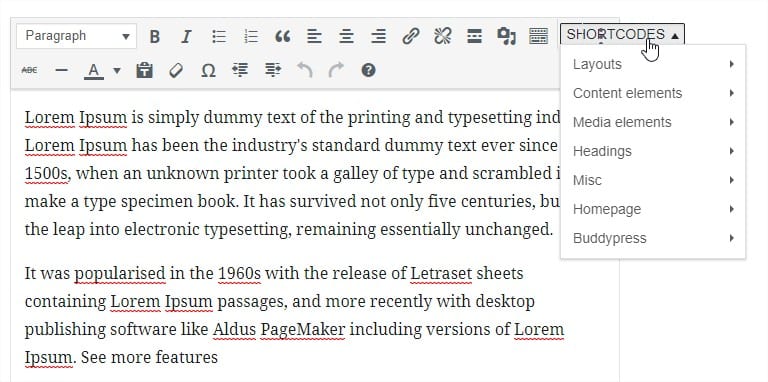
Section titled “Buttons”Shortcodes are small texts wrapped in “[” and “]” that are converted by WordPress.
This theme has a built in button in your editor for you to easily add shortcodes.
Using this button you will open a configuration screen and easily generate shortcodes and build pages right away.
[kleo_button url="" style="{standard|secondary|success|alert}" size="{standard|large|medium|small|tiny}" round="{0|radius|round}" icon="{0|fontawesome-icon},{before|after}" target="_self"] ButtonText [/kleo_button]You can generate FontAwesome icons right away:
[kleo_icon icon="fontawesome-icon" size={normal|large|2x|3x|4x}][kleo_icon icon="heart" size=normal]Shortcodes are small texts wrapped in “[” and “]” that are converted by WordPress.
This theme has a built in button in your editor for you to easily add shortcodes.
Using this button you will open a configuration screen and easily generate shortcodes and build pages right away.
[kleo_alert style="{standard|secondary|success|alert}"] This is an alert [/kleo_alert]Shortcodes are small texts wrapped in “[” and “]” that are converted by WordPress.
This theme has a built in button in your editor for you to easily add shortcodes.
Using this button you will open a configuration screen and easily generate shortcodes and build pages right away.
[kleo_panel style="{standard|callout}"] Panel content. [/kleo_panel]Accordion
Section titled “Accordion”Shortcodes are small texts wrapped in “[” and “]” that are converted by WordPress. This theme has a built in button in your editor for you to easily add shortcodes.
Using this button you will open a configuration screen and easily generate shortcodes and build pages right away.
[kleo_accordion] [kleo_accordion_item title="Title 1"] Accordion Item Content 1 [/kleo_accordion_item] [kleo_accordion_item title="Title 2"] Accordion Item Content 2 [/kleo_accordion_item] [/kleo_accordion]Shortcodes are small texts wrapped in “[” and “]” that are converted by WordPress.
This theme has a built in button in your editor for you to easily add shortcodes.
Using this button you will open a configuration screen and easily generate shortcodes and build pages right away.
[kleo_tabs] [kleo_tab title="Title 1" active=0] Tab Content 1 [/kleo_tab] [kleo_tab title="Title 2" active=1] Tab Content 2 [/kleo_tab] [/kleo_tabs]Progress bar
Section titled “Progress bar”Shortcodes are small texts wrapped in “[” and “]” that are converted by WordPress.
This theme has a built in button in your editor for you to easily add shortcodes.
Using this button you will open a configuration screen and easily generate shortcodes and build pages right away.
[kleo_progress_bar style="{standard|secondary|success|alert}" round="{0|1}" width="{1-100}"]Pricing table
Section titled “Pricing table”Shortcodes are small texts wrapped in “[” and “]” that are converted by WordPress.
This theme has a built in button in your editor for you to easily add shortcodes.
Using this button you will open a configuration screen and easily generate shortcodes and build pages right away.
[kleo_row] [kleo_one_third] [kleo_pricing_table title="Package 1" price="100 €" description="Description "] [kleo_pricing_item] Item description 1 [/kleo_pricing_item] [kleo_pricing_item] Item description 2 [/kleo_pricing_item] [/kleo_pricing_table] [/kleo_one_third] [kleo_one_third] [kleo_pricing_table title="Package 2" price="150 €" description="Description "] [kleo_pricing_item] Item description 1 [/kleo_pricing_item] [kleo_pricing_item] Item description 2 [/kleo_pricing_item] [/kleo_pricing_table] [/kleo_one_third] [kleo_one_third] [kleo_pricing_table title="Package 3" price="300 €" description="Description "] [kleo_pricing_item] Item description 1 [/kleo_pricing_item] [kleo_pricing_item] Item description 2 [/kleo_pricing_item] [/kleo_pricing_table] [/kleo_one_third] [/kleo_row]Image slider
Section titled “Image slider”[kleo_slider][kleo_slider_image src="IMG_SRC"][kleo_slider_image src="IMG_SRC"][/kleo_slider]Video button
Section titled “Video button”This shortcode opens a video in popup. The video is specified in the shortcode
[kleo_button_video url="http://www.youtube.com/embed/FtquI061bag" style="standard" size="standard" round="{radius|round}" icon="{fontawesome-icon},{before|after}"] My video popup [/kleo_button_video]Blog articles
Section titled “Blog articles”Example that shows blog articles You can choose to display by post formats: post_formats=“image,gallery,video”
[kleo_articles cat="all" limit="6" post_formats="all" post_types="post"]Posts carousel
Section titled “Posts carousel”Shortcodes are small texts wrapped in “[” and “]” that are converted by WordPress.
This theme has a built in button in your editor for you to easily add shortcodes.
Using this button you will open a configuration screen and easily generate shortcodes and build pages right away.
Example that shows Posts and testimonials but only Image,Gallery,video formats. If you want to display all post formats: post_formats=“all”
[kleo_posts_carousel cat="all" limit="6" post_formats="image,gallery,video" post_types="post,testimonials"]Testimonials
Section titled “Testimonials”Testimonials can be added just like a normal post. You can add testimonials from WP Admin -> Testimonials.
You can display testimonials with Testimonials Widget. Go to section WIDGETS AND SIDEBAR in this document.
Top members
Section titled “Top members”Display members that can be sorted by: active, popular, newest
[kleo_top_members]Member statistics
Section titled “Member statistics”You can generate whatever statistics you want using users profile fields.
Example:
This fields will return the number of users in Barcelona
[kleo_member_stats field="City" value="Barcelona"]Homepage status icon
Section titled “Homepage status icon”This shortcode generates members statistics with an icon based on the type attribute. If you have translated your default members profile fields then you need to change the gender in the type attribute to match you translated one. Example:
[kleo_status_icon type="Homme" image="http://seventhqueen.com/demo/sweetdatewp/wp-content/uploads/2013/06/apple-touch-icon-144x144.png" subtitle="Homme"]Recent groups
Section titled “Recent groups”Display recently active groups
[kleo_recent_groups]BuddyPress user data
Section titled “BuddyPress user data”Easy access BuddyPress user data with the help of the below shortcodes:
[kleo_total_members] - Total members
[kleo_members_online] -  Online members
[kleo_women_online] - Women online
[kleo_men_online] - Men online
The above code will generate the live data from your site:
Restrict content
Section titled “Restrict content”Only for members content shortcode:
[kleo_only_members]Content to show for members only[/kleo_only_members]Only for guests content shortcode:
[kleo_only_guests]Content to show for guests only[/kleo_only_guests]