
Changing section icons in profiles and groups
KLEO: Changing section icons in profiles and groupsOn profile and group pages, you’ll see icon bars like the one shown above. You can change these icons to anything you want, here’s how…
1: CSS IDs
Section titled “1: CSS IDs”Start by finding the CSS selector for the icon you want to change. You will need the id of the element associated with the icon. On profile pages it will end with “-personal-li” and on group pages it will end with “-groups-li”. The easiest way to do this is to install Google Chrome web browser, and then right-click on the icon you want to change and choose “Inspect Element” you’ll see something like this:
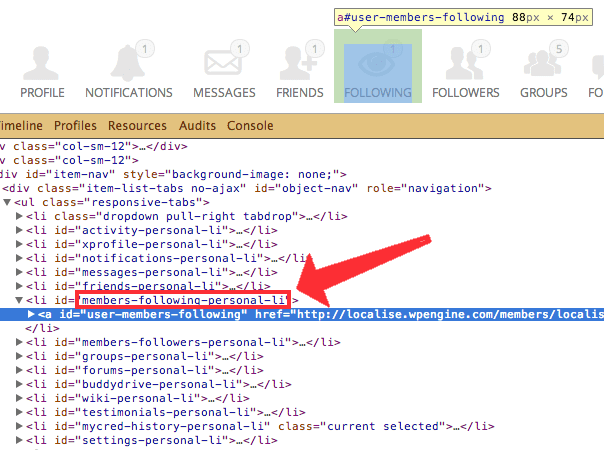
2: Icon IDs
Section titled “2: Icon IDs”In your WordPress installation folder, navigate to: wp-content/themes/kleo/assets/font and find the config.json file. Go to fontello.com and from the tools menu, choose Import:
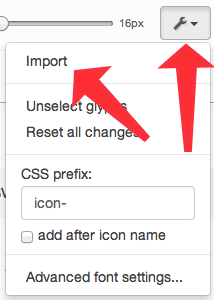
When prompted, upload your config.json file and the fontello website will highlight all the icons that KLEO provides. Next, click on the Customise Codes tab and you’ll see a list of the icons with their unique codes below them.
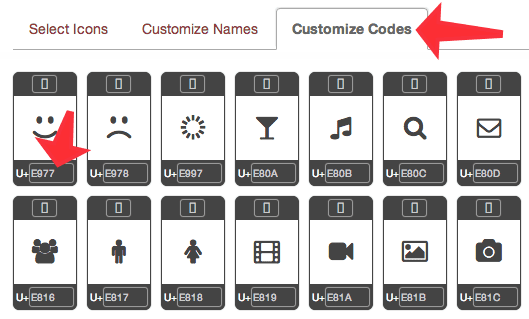
Find the icon you want to use and write down it’s code (the code always starts with “E”).
3: Write CSS
Section titled “3: Write CSS”The format of your CSS will be slightly different depending on whether you’re changing a profile icon or a group icon. In the example below, I’m changing the LOCATION icon for both profile (location-personal-li) and group (nav-gmw-group-location-groups-li) pages to icon number E868 (a map pin).
/* Profiles: LOCATION icon */#buddypress div#item-nav ul #location-personal-li a:before { content: "\E868"; }
/* Groups: LOCATION icon */#buddypress div#item-nav ul #nav-gmw-group-location-groups-li a:before { content: "\E868"; }
Note how there’s a # in front of the icon id, and a \ in front of the icon code.
4: Add CSS
Section titled “4: Add CSS”Important: Make sure that Kleo Child is the active theme (in Appearance > Themes) first!!
In the WordPress admin area, go in to Appearance > Editor and edit the Kleo Child: Stylesheet (style.css) - it looks like this:
/*Theme Name:     Kleo ChildTheme URI:Description:    Child theme for KleoAuthor:         SeventhQueenAuthor URI:     http://seventhqueen.comTemplate:       kleoTags:  one-column, two-columns, right-sidebar, fluid-layout, custom-menu, featured-images, post-formats, sticky-post, translation-readyLicense: GNU General Public LicenseLicense URI: license.txt*/
/** Please add your custom styles below*/
Add in the CSS code you made earlier and save it.
5: Test
Section titled “5: Test”After clearing your browser cache, go into the front end and refresh the profile or group page to check it’s working. If it’s not working, common mistakes include:
-
Forgetting to put the # in front of the icon id or mistyping the id
-
Forgetting to put the \ in front of the icon code
If you need help, please ask in our support forums.
6: Common ID’s
Section titled “6: Common ID’s”Common profile item id’s:
-
ACTIVITY: activity-personal-li
-
PROFILE: xprofile-personal-li
-
NOTIFICATIONS: notifications-personal-li
-
MESSAGES: messages-personal-li
-
FRIENDS: friends-personal-li
-
FOLLOWING: members-following-personal-li (BuddyPress Follow plugin)
-
FOLLOWERS: members-followers-personal-li (BuddyPress Follow plugin)
-
GROUPS: groups-personal-li
-
FORUMS: forums-personal-li
-
LOCATION: location-personal-li (Geo my WP plugin)
-
BUDDYDRIVE: buddydrive-personal-li (BuddyDrive plugin)
-
DOCS: docs-personal-li (BuddyDocs plugin)
-
SETTINGS: settings-personal-li
-
MEDIA: media-personal-li (rtMedia plugin)
-
MY ARTICLES: articles-personal-li (Social Articles plugin)
Common group item id’s:
-
HOME: home-groups-li
-
FORUM: nav-forum-groups-li (bbPress plugin)
-
DOCS: nav-docs-groups-li (BuddyDocs plugin - if you rename the menu item in its settings, the id will change)
-
MEMBERS: members-group-li
-
GROUP TREE: nav-hierachy-groups-li (BP Group Hierarchy plugin - when link is active, the id changes to group-hierarchy-group-li so you’ll need to add both to your CSS)
-
LOCATION: nav-gmw-group-location-groups-li (GMW Group Locator plugin)
-
SEND INVITES: invite-groups-li
-
EMAIL-OPTIONS: nav-notifications-groups-li (BuddyPress Group Email Subscription plugin)