Change "SIGN UP" URL at Modal Popup
SweetDate: Change "SIGN UP" URL at Modal PopupIf you want to change the URL of the SIGN UP link at the modal popup in SweetDate theme, you would need to edit the popup file at the child theme.
How to change the Create an account link:
Section titled “How to change the Create an account link:”-
At your website files, find wp-content/themes/sweetdate/page-parts and copy the file general-header.php
-
Go to wp-content/themes/sweetdate-child/page-parts ( create the page-parts folder if you don’t have it already ) and paste the file there.
-
Edit the file while you are at the child theme folder.
-
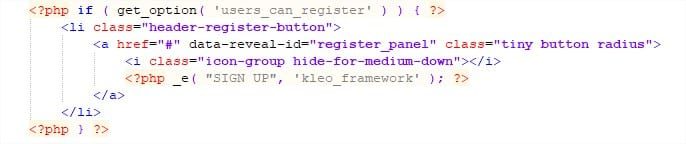
Find
-
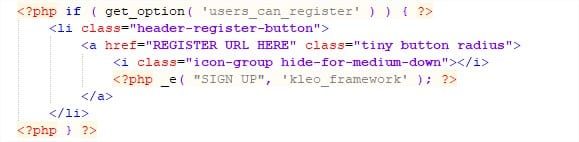
Change the HREF url and delete the data-reveal-id.
-
Just like this: